
Recently I’ve been doing some Atmel AVR Xmega work. The Atmel website says that their low-cost programmer, the AVRISP2, can be used to program an xmega device. But their (current) documentation would appear to tell a very different story. If you read the documentation, you’d reasonably conclude that it wouldn’t work at all.
In fact the AVRISP MkII can be used to program an Xmega part. You just need to know how to hook it up.
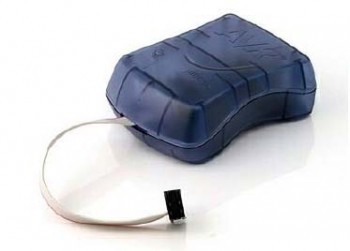
First of all, make sure you’re using the very latest version of AVR Studio, as you’ll need to use that as your programming software. (AVR Studio also contains a decent IDE, and a plugin to support the free WinAVR C compiler, so it’s actually much more than just a programming program, if you want it to be.)
The AVRISP2 has a 6-pin header. Here’s how to connect it to an Xmega part:
AVRISP2
PIN1 – xmega PDI data pin
2 – xmega VCC power rail
3 – no connect
4 – no connect
5 – xmega PDI clock (often the xmega reset pin)
6 – xmega GND power rail
That’s it. Only 4 pins to hook up. Now you can tell AVR studio which xmega part you have, select the AVRISP MkII programmer, and program away. Easy!
Excellent find – thanks for the tip.
Almost two years later…
I finally got around to playing with this, and I was unable to get this working. I checked my pinouts until I went cross-eyed and still couldn’t find any mistakes. Finally I found this forum:
http://www.avrfreaks.net/index.php?name=PNphpBB2&file=printview&t=107517&start=0
which suggested adding a 100K resistor between the PDI data pin and ground and VOILA! IT WORKS!
Remove the components on the RESET (PDI_CLK) pin and the AVRISPmkII will work.
I’d suggest you post your question on the forums at avrfreaks.net.
Hey Frank, I just got a XMEGA-A1 XPlained evaluation kit and hooked things up like you said but am having no luck programming it. From within either AVR studio 4 or 5 it will not support the ATxmega128A1 from the AVIISP mkII (000200051108). The status for the programmer is Available but it just says ATxmega128A1 Support is No.
I have the eval board powered up and both LEDs are green on the programmer.
Under Tools->AVR programming I have the Tool=AVRISPmkII, Device=ATxmega128A1, Interface=PDI
I cannot read the Device ID but the Target voltage test returns 3.0V
I just get this error “Unable to enter programming mode. Please verify that the programmer is correctly attached to the target and that target power has been switched on. Also verify that the correct device and interface settings have been specified.”
I don’t know what I am missing here.
Thanks for the info Frank. I’m looking to get into the xmega products but don’t have the dough at the moment to buy the JTAGICEMKII. I’ll look forward to playing with the Xplain board with my AVRISPMKII. Thanks too for your other Xplain Xmega Gotchas post!
Yes, as the posting above says, the AVR ISP II supports programming XMega with PDI. It works.
I need to program Xmega. I have searched a lot and found that I need to buy AVR ISP mkII programmer.
Is it true? If I buy this programmer can I be sure that I can program Xmega?
Does this programmer programmes just true PDI for XMega?
Pingback: Atmel Xplain Xmega board Gotchas by Frank's Random Wanderings
It works in eclipse. Just need to install new usb drivers. Google it…
This is a good place to start:
http://www.avrfreaks.net/
hi
this is shyam sundar actually i also heard about AVR but how to use/program it is not known can any one tell me how to ues it/program it
I don’t know. Last time I checked AVRdude, it didn’t support this. I guess it’s just a matter of keeping an eye on AVRdude periodically and waiting until it’s supported.
This is true. I also use the AVR ISP MKII to program XMega’s via PDI programming. Very fast actually. Question though? How do you use this vir AVRDude, so that I can use this via eclipse?
Regards