
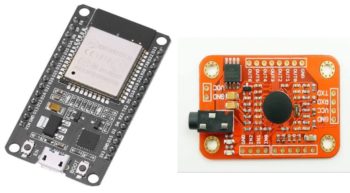
Update July 2025. From the comments I see many people having problems replicating what I did. I strongly suspect compatibility issues with the latest Arduino software / IDE. I originally did this work in 2022 so there will have been a lot of changes to Arduino in the intervening time. If anyone is able to get this working more recently, please post in the comments so that others can learn from it.
The original post now follows:
As part of a recent project to add standalone voice control to an oscilloscope, I wanted to marry an Elechouse voice recognition module V3 to an ESP32. Which worked out quite well, hence I’m making both the hardware information and the software available here.
Hardware
A couple of considerations when wiring the two modules together:
- The Elechouse VR3 is a 5V module, and the pins on the ESP32 are not 5V tolerant. Hence the 5V UART output pin from the VR3 needs to be reduced down to 3.3V for the ESP32 input pin. This is easily accomplished using two resistors.
- The ESP32 has 3 serial ports. By default the first, U0UXD, is used for the USB serial port, including for programming. The second, U1UXD, is commonly used to connect to an SPI flash chip. Hence only the third UART, U2UXD, is really safe to use. For this reason, both the wiring diagram shown below, and the software, assume the Elechouse VR3 is attached to the third UART, U2UXD.
Here’s how to wire the modules together:
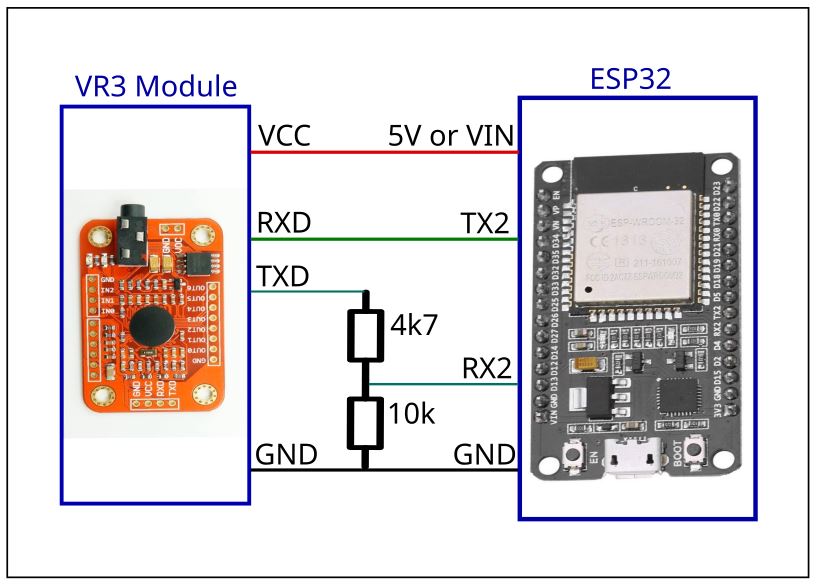 ESP32 – Elechouse VR3 Wiring
The ESP32 module gets power from its USB port, and provides that to the Elechouse VR3. Depending upon the exact ESP32 board you use, the 5V output pin on the ESP32 board might be named 5V, or it might be named (somewhat confusingly) VIN.
Software
The software uses Arduino running on the ESP32. Here’s a simple tutorial on setting it up:
https://randomnerdtutorials.com/installing-the-esp32-board-in-arduino-ide-windows-instructions/
The board I have selected is “ESP32 Dev Module”.
Make certain you can follow the little tutorial, to build / program / run the example. If you’re having trouble programming the board, try pressing the “boot” button for a few seconds during the programming phase.
Now install the Voice Recognition V3 library. Follow the instructions from the Elechouse github page here:
GitHub – elechouse/VoiceRecognitionV3: Arduino library for elechouse Voice Recognition V3 module
Which is basically just downloading the .zip file and unzipping it into the specified location. BUT, Elechouse provides an older arduino library which does not fully work on the ESP32. Once you’ve installed the Elechouse library, overwrite 4 of those files with my updated files from here:
 Or if you prefer, you can grab them individually from github here.
These are ESP32-specific files; they won’t work on an Atmel / Microchip Arduino. But they do work for ESP32 Arduino. The files are:
- VoiceRecognitionV3.cpp and .h
- vr_sample_train.ino
- vr_sample_bridge.ino
VoiceRecognitionV3.cpp and .h are the main library file. These have been modified to work on the ESP32 by updating the serial port calls to use the native ESP32 serial port functions. In addition the serial port has been hard-coded (in the “begin” method) to use port U2UXD. When instantiating the class you can pass in other pin numbers but they’re ignored – those parameters are retained for backwards compatibility, but are otherwise ignored.
Transmissions from the ESP32 to the VR3 have also been slowed a little. A small delay has been inserted between successive bytes when sending commands to the VR3 – this appears to improve reliability.
The VR3 defaults to 9600 baud, so when calling the “begin” method, always pass in 9600 unless the VR3 baud rate has been explicitly changed.
vr_sample_train.ino and vr_sample_bridge.ino are two of the examples provided by Elechouse, and they’re very useful. The only change made to these two files is deleting this line:
#include <SoftwareSerial.h>
from each of them. As SoftwareSerial is not applicable to ESP32 Arduino, and results in a build error.
For how & why to use vr_sample_train and vr_sample_bridge, see the Elechouse documentation
https://www.elechouse.com/elechouse/images/product/VR3/VR3_manual.pdf
or my oscilloscope voice control project, where I describe how to train and use the VR3 module.
Summary
That’s all there is to it. Some simple wiring including a couple of resistors. Arduino on the ESP32 with the updated ESP32 Elechouse Voice Recognition V3 software files. Then you’re free to train the VR3 with your words, and have the ESP32 do things when those words are spoken. For the oscilloscope voice control it’s working quite nicely.
Hi Frank, Can you please help me, i have a logic level converter and I wanna know how can i use it for this.
learn esp32 and voice recognize module
There is a bug in VoiceRecognitionV3.cpp. Line 1203, It is missing
Serial2.write(buf, len);
Hola amigo conecté un esp32 concretamente el WROOM 32 con esa libreria que proporcionaste y funciona,me deja entrenar el modulo y todo pero cuando voy a cargar los comandos me dice LOAD failed or timeout al momento y no puedo cargarlos.
HI Frank, can you tell me how can you use the command train with esp32 because I can only use Sigtrain. Every time I use train command, it will timeout. And also I cannot load the record into VR using Load command. Can you help me with that. Thank you!
Good morning. I installed the library and uploaded the code to my esp32 (i did the circuit too). The code compiled successfully but the voice recognition module does not work. my esp32 module is DOIT devkit v1 module. I tried on another esp32 too but it still wont work.
Hey, great idea! I’ve tried replicating it, but I get a somewhat weird issue. I’ve trained the module with an Arduino and everything works on there. Then switched to your code and your approach with an ESP32 and I can use the “records” command which will show the trained commands, but using “load” or “train” always results in an error / timeout. Did this happen to you, too?
U2UXD is in use and I can’t change that, do you know of a solution?
i could not make it work with my esp32 wroom devkit 38pin development board. please help
Bro, I badly need your help.
I followed everything that you did, but everytime I enter “train 0” , “train 1” , etc.
The output always goes like this
23:25:24.534 -> train 0
23:25:24.534 -> ——————————————————————————–
23:25:33.747 -> Train Timeout.
23:25:33.747 -> ——————————————————————————–
23:26:53.213 -> train 0
23:26:53.213 -> ——————————————————————————–
23:27:01.940 -> Train Timeout.
23:27:01.940 -> ——————————————————————————–
But it the “record”, “help”, “settings” and the other commands just works fine. I have been solving this all day, I can’t seem to find the bug or something.
I will appreciate some feedbacks bro. Thank you so much !
Thank you, but i have face some problem
1. “train” command not working, when I send train 0 or others number then nothing show. after some seconds reply “Train Timeout.”
2. “sigtrain” Command work perfectly. I have set voice command but problem “Load” Command not working, when “sigtrain” Command Successfully Trained then i use “load” command, after 1 sec reply “Load failed or timeout.”
Need your help for solutions
Frank, many thanks for sharing this, was just about to try out the module and started looking for possible ways to use with the ESP32 – as a means to replace Alexa!