
Recently I upgraded to FreeNAS 9.10. Not that there was anything inherently wrong with my previous 9.2 system, however it was booting from a USB stick, which died (my second USB stick to die over the past few years), so I had to do something. I decided to install FreeNAS to an SSD this time around, in the hope the SSD would be more reliable. One $50 Intel SSD later, a quick install of 9.10, and the NAS was back up and running. No drama.
Well, perhaps one minor drama. I have backups of the NAS files being performed by a Linux box. Periodically the Linux box connects to the NAS via rsync and copies all of the updated files. It’s worked great for years. But now with FreeNAS 9.10, the rsync backups no longer worked.

Taking a look at the Linux box, I find rsync reporting an error:
no matching cipher found: client arcfour
rsync over a network requires the use of encryption. Not that I care; these backups are happening on my local network so I’d be happy with plaintext. Still, rsync requires it, so I selected arcfour. Why? Because it’s the simplest / fastest cypher available. However arcfour is not super secure, so recent versions of OpenSSH have disabled it (and some others) by default.
To re-enable arcfour on FreeNAS is pretty simple. The sshd_config file needs to have this line inserted:
Ciphers 3des-cbc,blowfish-cbc,cast128-cbc,arcfour,arcfour128,arcfour256,aes128-cbc,aes192-cbc,aes256-cbc,[email protected],aes128-ctr,aes192-ctr,aes256-ctr,[email protected],[email protected],[email protected]
This tells SSH its full list of supported cyphers, including arcfour. A simple way to accomplish that in FreeNAS is to go to Services -> SSH and click on “Advanced Mode”. Then copy the above “Ciphers” line into the “Extra options:” field.
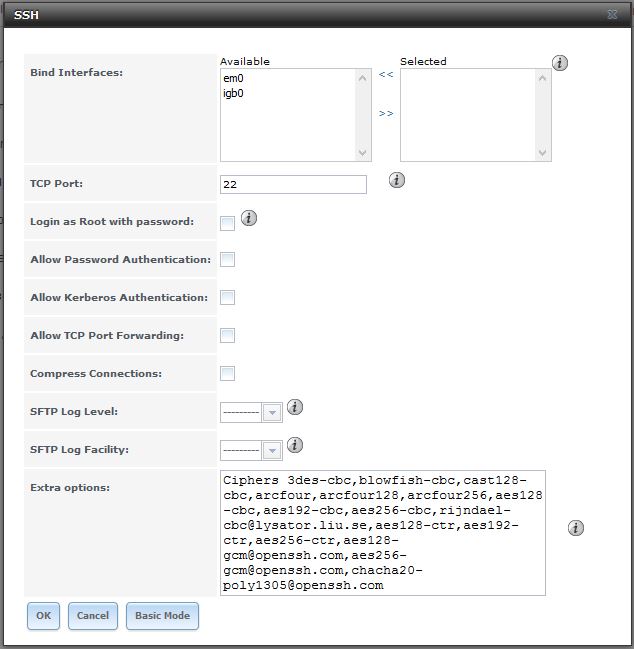
Restart SSH and voila, rsync backups are working again.
where did you find that line that needed to be inserted???